Overview
The BMI Calculator computes your Body Mass Index and provides comprehensive health insights including metabolic rate, calorie needs, and goal tracking. Beyond a simple number, it shows where you fall on the BMI scale and helps you understand what it means for your health.
Input form
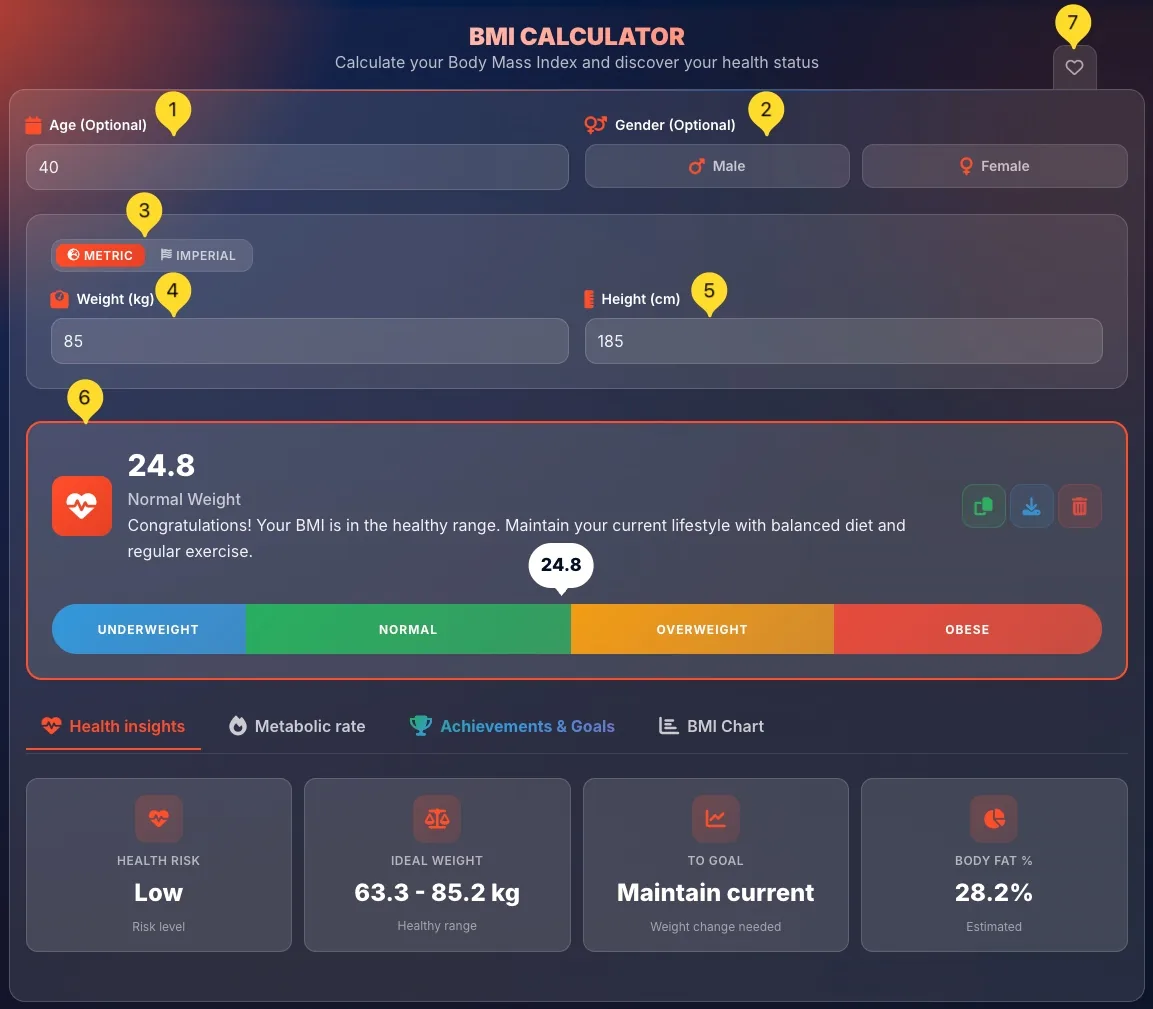
The input form collects your measurements. Some fields are optional but provide more personalized results.
Age (Optional)
Enter your age in years. This field is optional but enables more accurate metabolic rate calculations. The field has a calendar icon.
Gender (Optional)
Select Male or Female by clicking one of the buttons. Gender affects metabolic rate calculations. Leave unselected if you prefer not to specify.
Choose units - METRIC or IMPERIAL
Click METRIC for kilograms and centimeters, or IMPERIAL for pounds and inches. The active option is visually highlighted. Switch anytime - values will convert automatically.
Enter Weight
Type your weight in the Weight field. In metric mode, enter kilograms (e.g., "90"). In imperial mode, enter pounds.
Enter Height
Type your height in the Height field. In metric mode, enter centimeters (e.g., "185"). In imperial mode, enter inches.
View instant results
As soon as you enter weight and height, your BMI calculates instantly. No need to click a button - results appear automatically below the form.
Favorites tab
On the right edge of the screen, you'll find the Favorites tab (heart icon). Click it to add this tool to your favorites for quick access from the homepage.
Result display Main Result
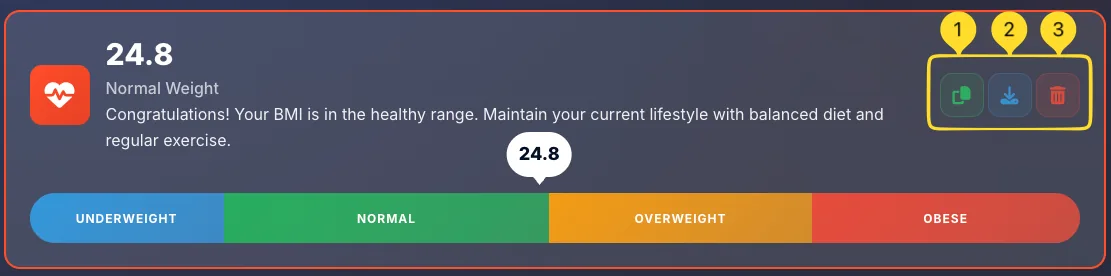
Your BMI result appears in a prominent box. This box contains your BMI value, category, description, and a visual scale.
BMI value (large number)
Your calculated BMI appears as a large bold number (e.g., 26.3). This is your weight-to-height ratio.
Category name
Below the number, you see your category: Underweight, Normal, Overweight, or Obese. This tells you which range your BMI falls into.
Health description
A brief explanation of what your BMI category means. For example: Your BMI indicates that you are overweight. Consider lifestyle modifications including diet and exercise to reduce health risks.
Heart icon
A heart icon appears on the left side of the result box, indicating this is health-related information.
BMI scale bar Visual Guide
Below your BMI result, a colorful horizontal bar shows where your BMI falls within the WHO classification ranges. This visual guide makes it easy to understand your result at a glance.
Your position marker
A small marker with your BMI value (e.g., 26.3) points to your exact position on the scale. This shows visually where you stand within your category.
UNDERWEIGHT (Blue) - Below 18.5
The leftmost segment in blue. BMI below 18.5 may indicate insufficient body weight. This can be due to various factors including metabolism, nutrition, or health conditions. Increased health risk: consult a healthcare provider if consistently underweight.
NORMAL (Green) - 18.5 to 24.9
The green segment represents the healthy range. BMI between 18.5 and 24.9 is generally associated with the lowest health risks. This is the target range for most adults.
OVERWEIGHT (Orange/Yellow) - 25.0 to 29.9
The yellow/orange segment indicates BMI between 25.0 and 29.9. This range is associated with increased health risks including heart disease, type 2 diabetes, and high blood pressure.
OBESE (Red) - 30.0 and above
The rightmost segment in red. BMI of 30 or higher is classified as obese with high health risks. Subdivided into Class I (30-34.9), Class II (35-39.9), and Class III (40+).
Result actions
The result box has three action buttons on the right side:
4 result tabs
Below the main result, you'll find 4 tabs that provide deeper insights into your health metrics:
• Health insights: Risk level, ideal weight, body fat estimate
• Metabolic rate: Calories for maintenance, loss, or gain
• Achievements & Goals: Track progress and earn badges
• BMI Chart: WHO classification reference table
Click any tab to switch views. The active tab is visually highlighted.
Health insights tab Health insights
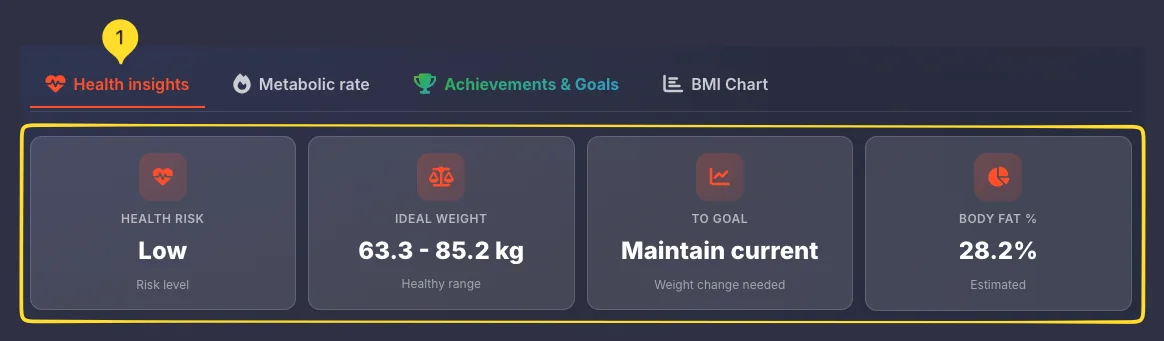
The Health insights tab shows personalized health metrics based on your BMI calculation.
Switch to Health insights tab
Click the Health insights tab (with a heart icon). This is usually the default tab after calculation.
View 4 health cards
You'll see 4 cards arranged in a row, each showing a different health metric derived from your BMI.
HEALTH RISK card
Shows your estimated health risk level based on BMI category:
• Low: Normal BMI range
• Increased: Underweight or Overweight
• High: Obese range
IDEAL WEIGHT card
Displays the healthy weight range for your height (e.g., 63.3 - 85.2 kg). This is the weight range that would give you a BMI between 18.5 and 24.9.
TO GOAL card
Shows how much weight change is needed to reach the healthy range. Example: Lose 4.8 kg or Gain 3.2 kg. If already in normal range, shows On target.
BODY FAT % card
Provides an estimated body fat percentage based on your BMI, age, and gender (e.g., 28.4%).
Note: This is an estimate - actual body fat requires specialized measurement.
Metabolic rate tab Metabolic rate
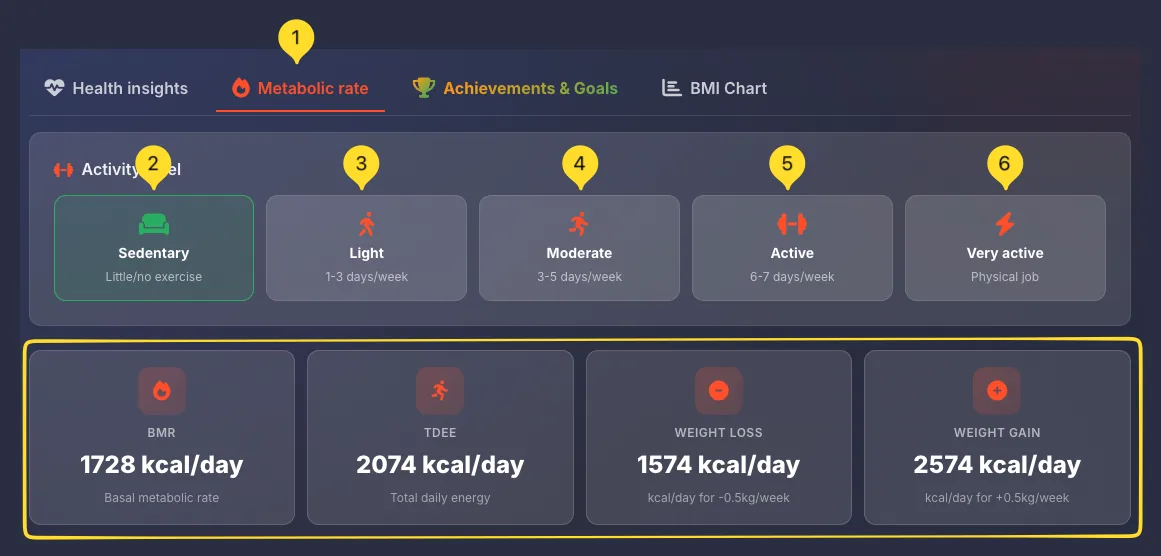
The Metabolic rate tab calculates your daily calorie needs for maintenance, weight loss, or weight gain. You must select an activity level for accurate results.
Switch to Metabolic rate tab
Click the Metabolic rate tab (with a fire icon). The tab highlights orange when active.
Select Activity level
At the top, you'll see 5 activity level options. Click one to select it (the selected option is visually highlighted).
Activity level options
Choose the option that best describes your typical week:
• Sedentary: Little/no exercise (desk job)
• Light: 1-3 days/week exercise
• Moderate: 3-5 days/week exercise
• Active: 6-7 days/week exercise
• Very active: Physical job or intense training
BMR card
Basal Metabolic Rate (e.g., 1813 kcal/day) - calories your body burns at complete rest, just to maintain basic functions like breathing and circulation.
TDEE card
Total Daily Energy Expenditure (e.g., 2176 kcal/day) - total calories burned including activity. This is your maintenance level - eating this amount keeps weight stable.
WEIGHT LOSS card
Shows calories for safe weight loss (e.g., 1676 kcal/day). Based on -0.5 kg/week deficit (500 kcal/day below TDEE). A healthy, sustainable rate.
WEIGHT GAIN card
Shows calories for healthy weight gain (e.g., 2676 kcal/day). Based on +0.5 kg/week surplus (500 kcal/day above TDEE). Good for muscle building.
Achievements & Goals tab Achievements
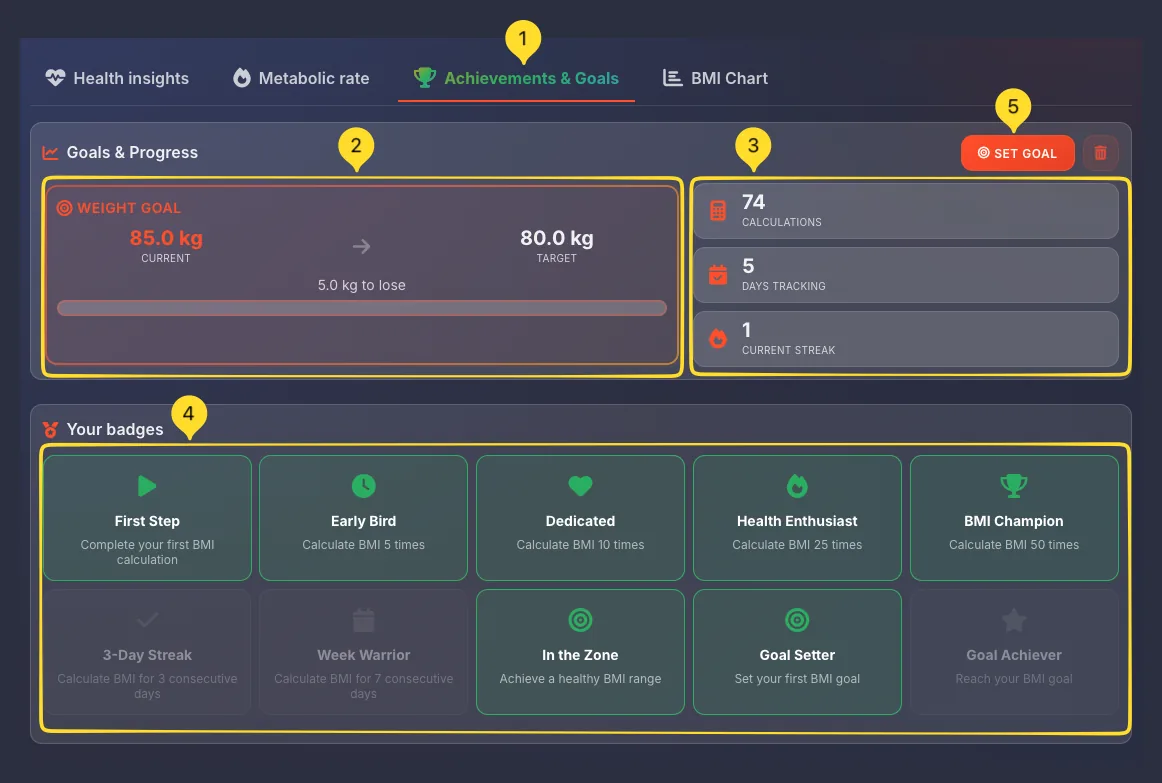
The Achievements & Goals tab gamifies your health tracking with badges and allows you to set weight goals.
Switch to Achievements & Goals tab
Click the Achievements & Goals tab (with a trophy icon). The tab has green text when active.
Goals & Progress section
At the top, you see your WEIGHT GOAL card with a progress bar showing current weight → target weight. Click SET GOAL button to set a target.
Tracking statistics
Three stat cards show your usage:
• CALCULATIONS: Total BMI calculations made (e.g., 67)
• DAYS TRACKING: Days you've used the calculator
• CURRENT STREAK: Consecutive days of tracking
Your badges section
Below the stats, you see 10 achievement badges arranged in 2 rows. Green badges are unlocked (earned). Gray badges are still locked.
Calculation badges
Earned by calculating BMI repeatedly:
• First Step: First BMI calculation
• Early Bird: 5 calculations
• Dedicated: 10 calculations
• Health Enthusiast: 25 calculations
• BMI Champion: 50 calculations
Streak badges
Earned by consistent daily tracking:
• 3-Day Streak: 3 consecutive days
• Week Warrior: 7 consecutive days
Goal badges
Earned by setting and achieving goals:
• In the Zone: Achieve healthy BMI range
• Goal Setter: Set your first weight goal
• Goal Achiever: Reach your weight goal
Setting a weight goal
You can set a target weight to track your progress over time. The tool remembers your goal and shows progress toward it.
Open the Set Goal modal
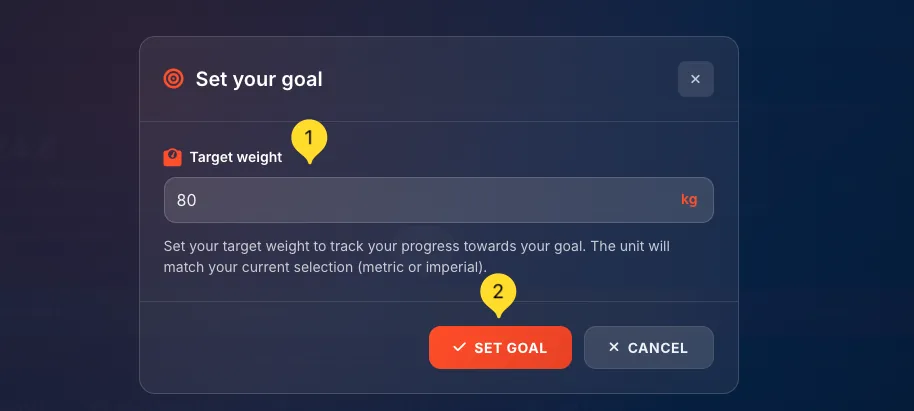
On the Achievements & Goals tab, click the orange SET GOAL button in the top right corner. A modal window appears.
Enter Target weight
In the Target weight field, type your goal weight. The unit (kg or lb) matches your current selection (metric or imperial).
Confirm your goal
Click the orange SET GOAL button to save. Or click CANCEL to close without saving.
Track your progress
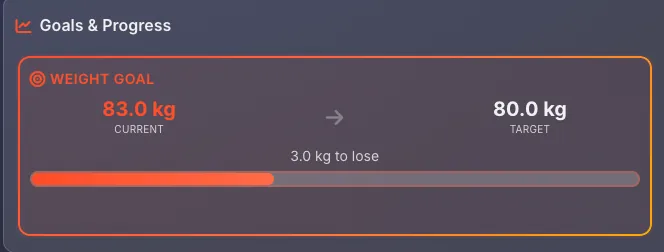
After setting a goal, the WEIGHT GOAL card shows your current weight, target weight, and a progress bar filling as you get closer to your goal.
Delete your goal
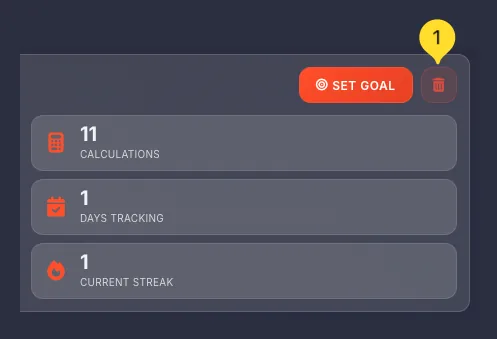
To remove a goal, click the trash icon next to the SET GOAL button. This clears your target and resets the progress display.
BMI Chart tab Reference
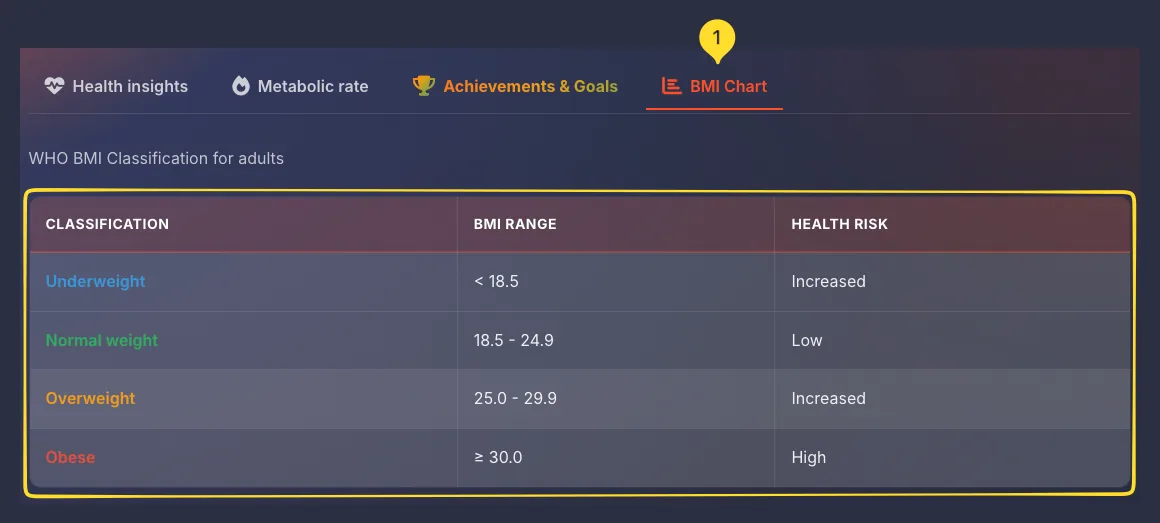
The BMI Chart tab displays the official WHO BMI classification table for reference.
Switch to BMI Chart tab
Click the BMI Chart tab (with a chart icon). You'll see a reference table.
Table structure
The table has 3 columns: CLASSIFICATION, BMI RANGE, and HEALTH RISK. Each row represents one BMI category.
Read the classifications
The 4 rows show WHO BMI categories for adults:
• Underweight (cyan text): < 18.5 → Increased risk
• Normal weight (green text): 18.5 - 24.9 → Low risk
• Overweight (orange text): 25.0 - 29.9 → Increased risk
• Obese (red text): ≥ 30.0 → High risk
Use as reference
This table is the same WHO classification used worldwide. Use it to understand the standard categories and their associated health risks.
Limitations of BMI
Frequently asked questions
• Green (Normal): BMI 18.5-24.9, the healthy range
• Orange (Overweight): BMI 25-29.9, increased health risks
• Red (Obese): BMI 30+, high health risks
The marker shows your exact position on the scale.