Overview
The Unit Converter transforms values between different measurement units across 10 categories: Length, Weight, Temperature, Volume, Speed, Area, Time, Data, Energy, and Pressure. It features smart cross-category search - just start typing any unit name and the tool finds it automatically, even from other categories. Results update instantly as you type, and you can customize number formatting with different separators.
Interface overview
The Unit Converter has a clean, organized layout with category selection at the top and the converter below.
Conversion category section
A grid of 10 category buttons for selecting what type of measurement to convert. Each button shows an icon, category name, and example units. The selected category is highlighted.
Convert section
The main conversion area with input field (left), unit dropdowns, swap button (center), and result field (right).
Result section
Shows the converted value instantly as you type. The result updates in real-time - no button needed.
Number separator
At the bottom left, a Number separator dropdown lets you choose how large numbers are formatted (commas, spaces, or dots).
Category badge
Bottom right shows the current category as a badge (e.g., "Length CATEGORY"). This confirms which category is active.
Favorites tab
Click the heart icon in the tool tabs to add this tool to your favorites for quick access.
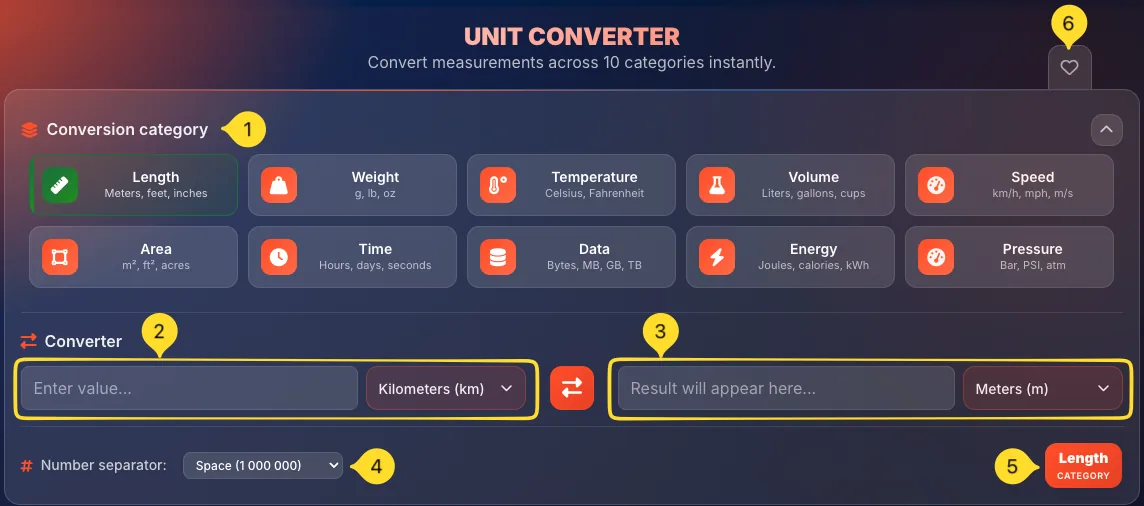
10 conversion categories Category Grid
The Conversion category section displays 10 buttons arranged in 2 rows of 5. Each button has an icon, name, and example units. Click any button to switch categories.
Length
• Example units: Meters, feet, inches
• Includes: Kilometers, Miles, Yards, Centimeters, Millimeters, Feet, and more
• Use for: Distance, height, dimensions
Weight
• Example units: g, lb, oz
• Includes: Metric Tons, Kilograms, Grams, Milligrams, Pounds, Ounces
• Use for: Mass, body weight, ingredients
Temperature
• Example units: Celsius, Fahrenheit
• Includes: Celsius, Fahrenheit, Kelvin
• Use for: Weather, cooking, science
Volume
• Example units: Liters, gallons, cups
• Includes: Milliliters, Liters, Gallons (US/UK), Cups, Tablespoons, Fluid Ounces
• Use for: Cooking, liquids, containers
Speed
• Example units: km/h, mph, m/s
• Includes: Kilometers per hour, Miles per hour, Meters per second, Knots
• Use for: Vehicles, running, wind
Area
• Example units: m², ft², acres
• Includes: Square meters, Square feet, Acres, Hectares, Square kilometers
• Use for: Land, floor space, surfaces
Time
• Example units: Hours, days, seconds
• Includes: Milliseconds, Seconds, Minutes, Hours, Days, Weeks, Months, Years
• Use for: Duration, scheduling, calculations
Data
• Example units: Bytes, MB, GB, TB
• Includes: Bytes, Kilobytes, Megabytes, Gigabytes, Terabytes (and binary: KiB, MiB, GiB)
• Use for: File sizes, storage, bandwidth
Energy
• Example units: Joules, calories, kWh
• Includes: Joules, Calories, Kilocalories, Kilowatt-hours, BTU
• Use for: Food energy, electricity, physics
Pressure
• Example units: Bar, PSI, atm
• Includes: Bar, Pascal, PSI, Atmosphere, Torr, mmHg
• Use for: Tires, weather, hydraulics
Converter section Main Tool
The Converter section is where you enter values and see results. It has a symmetrical layout with input on the left and output on the right.
Section header
Shows Converter with a swap arrows icon, indicating this is the conversion area.
Input field
The left input field:
• Placeholder: Enter value...
• Type any number here
• Supports decimals (e.g., 3.5, 0.75)
• Result updates instantly as you type
From unit dropdown
Next to the input field, a dropdown showing the source unit:
• Example: "Kilometers (km)"
• Click to open unit selector
• Shows current unit with abbreviation
Swap button
The swap button (two arrows) in the center:
• Click to swap the from/to units
• Reverses conversion direction instantly
• Example: km→m becomes m→km
Result field
The right output field:
• Placeholder: Result will appear here...
• Shows converted value automatically
• Read-only (calculated, not editable)
• Updates in real-time
To unit dropdown
The dropdown on the far right showing the target unit:
• Example: "Meters (m)"
• Click to change target unit
• Same unit selector as the "from" dropdown
Smart unit search Power Feature
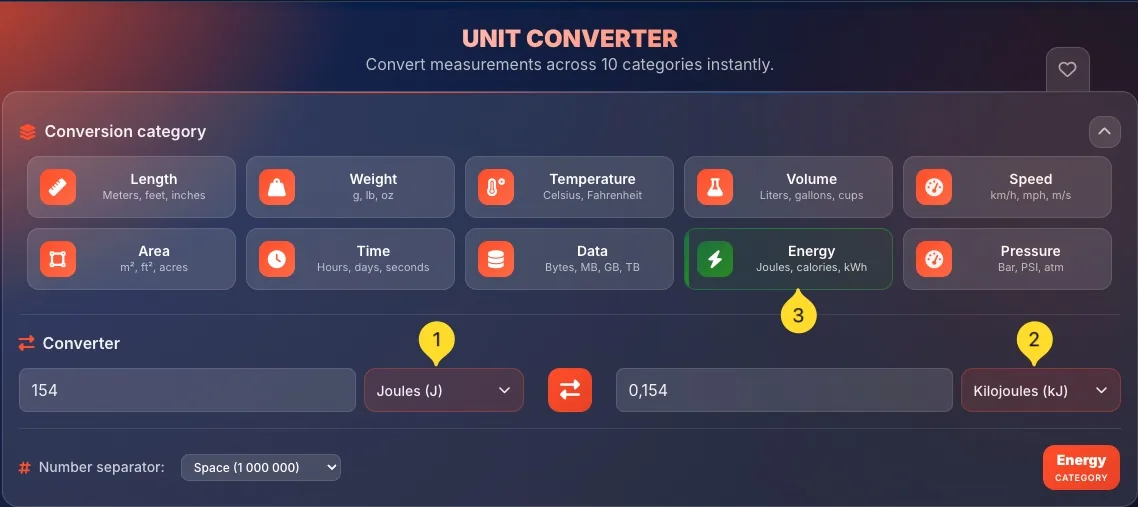
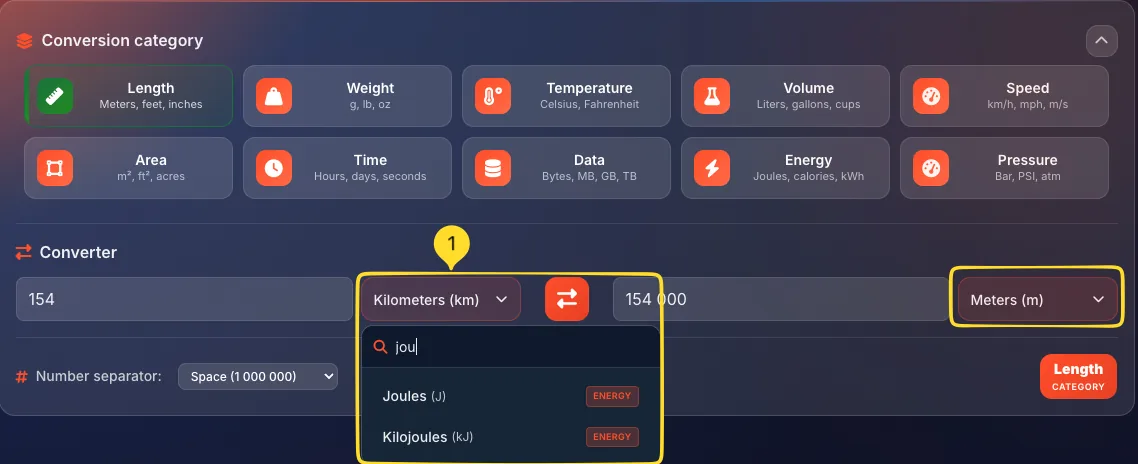
The Smart Search is the most powerful feature of this unit converter. When you open a unit dropdown and start typing, it searches across ALL categories - not just the current one. If you select a unit from a different category, the tool automatically switches to that category!
Open the unit dropdown
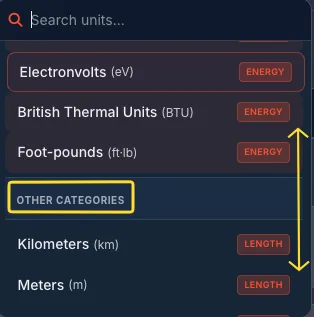
Click either the "from" or "to" unit dropdown. A dropdown panel opens showing:
• Search field at the top with magnifying glass icon
• List of units from the current category
• Each unit shows name, abbreviation, and category badge
Start typing to search
Just start typing in the "Search units..." field. As you type, the list filters in real-time. For example, type "kilo" to find Kilometers, Kilograms, Kilowatt-hours, etc.
Cross-category results
This is the magic: Your search finds units from ALL categories, not just the current one! If you're in Length but type "pounds", you'll see:
• OTHER CATEGORIES section header
• Weight units like Pounds (lb) with WEIGHT badge
Automatic category switch
When you select a unit from another category, the tool:
• Automatically switches to that category
• Updates both input and output dropdowns
• Changes the category badge at the bottom
No need to manually click the category button first!
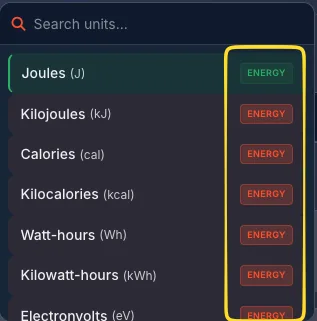
Category badges in search
Each unit in search results shows a colored badge indicating its category:
• LENGTH: for length units
• WEIGHT: for weight units
• etc.
This helps you identify which category a unit belongs to.
Why this is powerful
Traditional converters make you:
• First select a category
• Then find your unit in a long list
With Smart Search, you can:
• Type the unit name directly
• Done - category switches automatically!
It's like having a universal search for all units.
Unit dropdown details Unit Selection
The unit dropdown provides a comprehensive view of available units with helpful organization and visual cues.
Dropdown structure
When you click a unit dropdown, it shows:
• Search field (top) - "Search units..."
• Current category units: listed first
• OTHER CATEGORIES section - units from other categories (when searching)
Unit display format
Each unit is displayed as:
• Unit name: e.g., "Kilometers"
• Abbreviation in parentheses - e.g., "(km)"
• Category badge on the right - e.g., "LENGTH"
The currently selected unit is highlighted.
Length units example
In the Length category, you'll see:
• Kilometers (km)
• Meters (m)
• Centimeters (cm)
• Millimeters (mm)
• Miles (mi)
• Yards (yd)
• Feet (ft)
• Inches (in)
• ...and more
Weight units example
In the Weight category:
• Metric Tons (t)
• Kilograms (kg)
• Grams (g)
• Milligrams (mg)
• Pounds (lb)
• Ounces (oz)
• Stones (st)
Selecting a unit
Click any unit to select it:
• The dropdown closes
• The button updates to show the new unit
• If it's from another category, category switches automatically
• The conversion recalculates instantly
Number separator Formatting
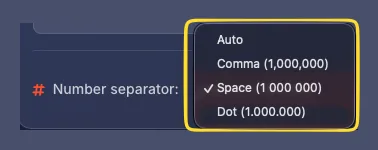
The Number separator dropdown at the bottom left lets you choose how large numbers are displayed. Different regions use different conventions.
Separator location
At the bottom left of the converter, you'll see:
• # Number separator: label
• Dropdown showing current format (e.g., "Space (1 000 000)")
Available options
4 formatting options:
• Auto: uses your browser/system locale
• Comma (1,000,000): US/UK style
• Space (1 000 000): International/SI style
• Dot (1.000.000): European style
Comma format
Comma (1,000,000)
• Common in: US, UK, Australia
• Uses comma as thousands separator
• Uses period for decimals: 1,234.56
Space format
Space (1 000 000)
• Common in: France, international scientific
• Uses space as thousands separator
• SI/metric standard
• Clear and unambiguous
Dot format
Dot (1.000.000)
• Common in: Germany, Spain, Italy, Brazil
• Uses period as thousands separator
• Uses comma for decimals: 1.234,56
When to use
Choose the format that matches:
• Your region's convention
• Your document's target audience
• The system you're copying values into
Quick reference
• 1 foot = 30.48 cm
• 1 mile = 1.609 km
• 1 meter = 3.281 feet
• 1 yard = 0.914 m
• 1 kg = 2.205 pounds
• 1 ounce = 28.35 grams
• 1 stone = 6.35 kg
• 1 metric ton = 1000 kg
• °C to °F: (°C × 9/5) + 32
• 0°C = 32°F
• 100°C = 212°F
• -40°C = -40°F
• 1 liter = 0.264 gallons
• 1 cup = 237 mL
• 1 tablespoon = 15 mL
• 1 UK gallon = 4.546 L
• 1 km/h = 0.621 mph
• 100 km/h ≈ 62 mph
• 60 mph ≈ 97 km/h
• 1 knot = 1.852 km/h
• 1 MB = 1024 KB
• 1 GB = 1024 MB
• 1 TB = 1024 GB
• Note: Storage marketed in decimal shows less in OS