Overview
The UUID Generator creates universally unique identifiers (UUIDs) compliant with RFC 4122. UUIDs are 128-bit identifiers used to uniquely identify information in computer systems. This tool supports 5 different UUID versions, each with its own generation method and use cases.
Interface overview
The UUID Generator has a clean, organized interface. Here's what you'll find:
UUID Version selector
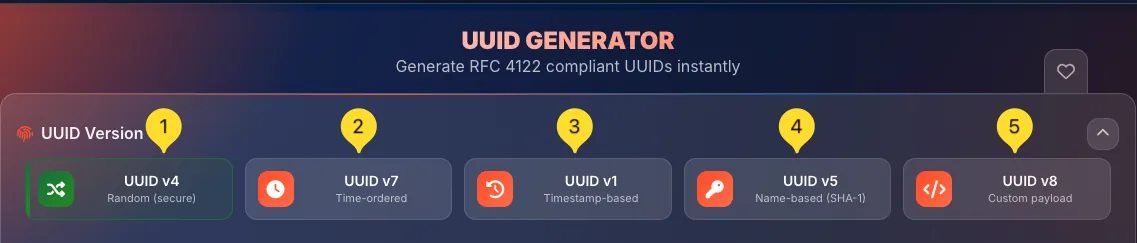
At the top, you'll see 5 version buttons:
• UUID v4: Random (secure)
• UUID v7: Time-ordered
• UUID v1: Timestamp-based
• UUID v5: Name-based (SHA-1)
• UUID v8: Custom payload
Click any button to switch versions. The active version shows with a colored border (green). You can also collapse this section using the arrow icon on the right.
Settings panel
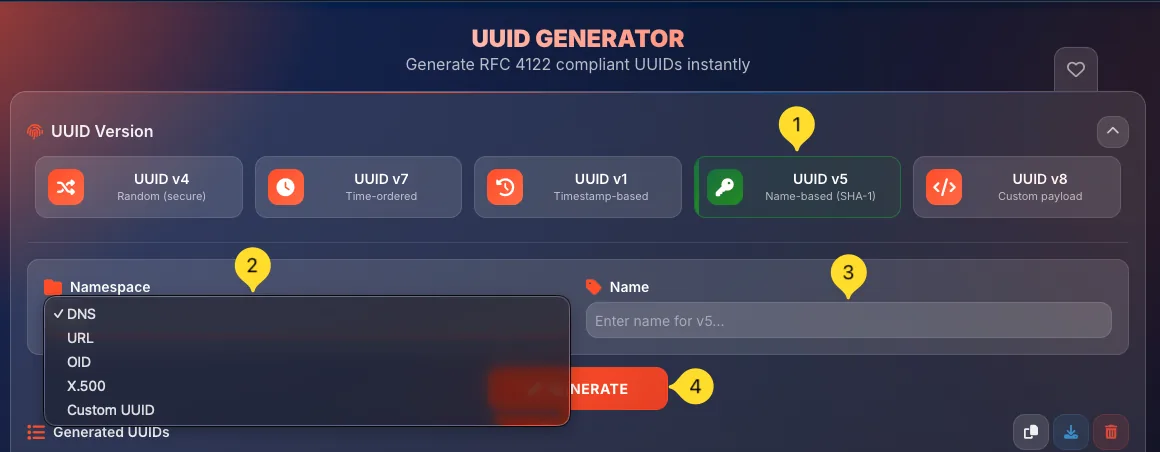
Below the version selector, you'll find version-specific settings:
• v4, v7, v1: Count field only
• v5: Namespace dropdown + Name input (+ Custom NS for custom namespace)
• v8: Custom payload configuration
Generate button
The orange GENERATE button creates UUIDs with your current settings. Click it to generate the specified number of UUIDs.

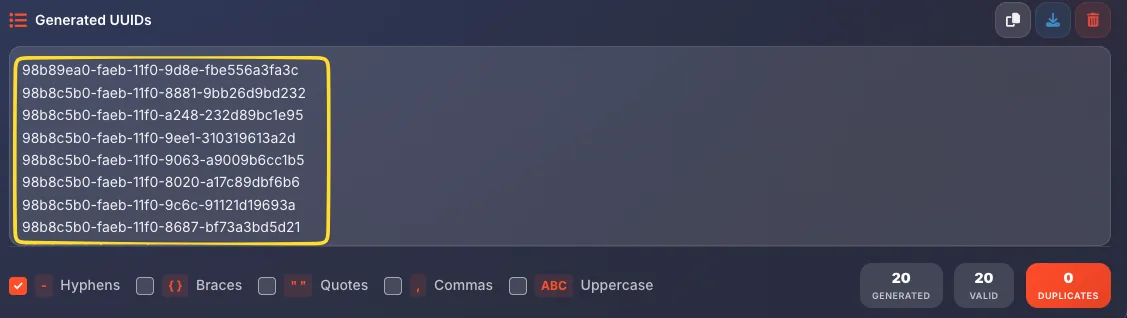
Generated UUIDs section
The Generated UUIDs area displays your generated UUIDs. Before generation, it shows Generated UUIDs will appear here.... On the right side are three action buttons:
• Copy (clipboard icon) - copy all UUIDs to clipboard
• Download (download icon) - download as text file
• Clear (trash icon) - clear all generated UUIDs
Output formatting options
At the bottom left, checkboxes control UUID formatting:
• Hyphens: include standard hyphens (default is enabled)
• Braces: wrap in curly braces {}
• Quotes: wrap in double quotes ""
• Commas: add commas between UUIDs
• Uppercase: convert to uppercase letters

Statistics counters
Bottom right shows three counters:
• GENERATED: total UUIDs created
• VALID: UUIDs that pass validation
• DUPLICATES: any duplicate UUIDs detected

Favorites tab
On the right edge, the heart icon lets you add this tool to your favorites for quick access from the homepage.

UUID v4 (Random) Most popular
UUID v4 generates cryptographically secure random identifiers. This is the most commonly used version and the default when you open the tool.
Select UUID v4
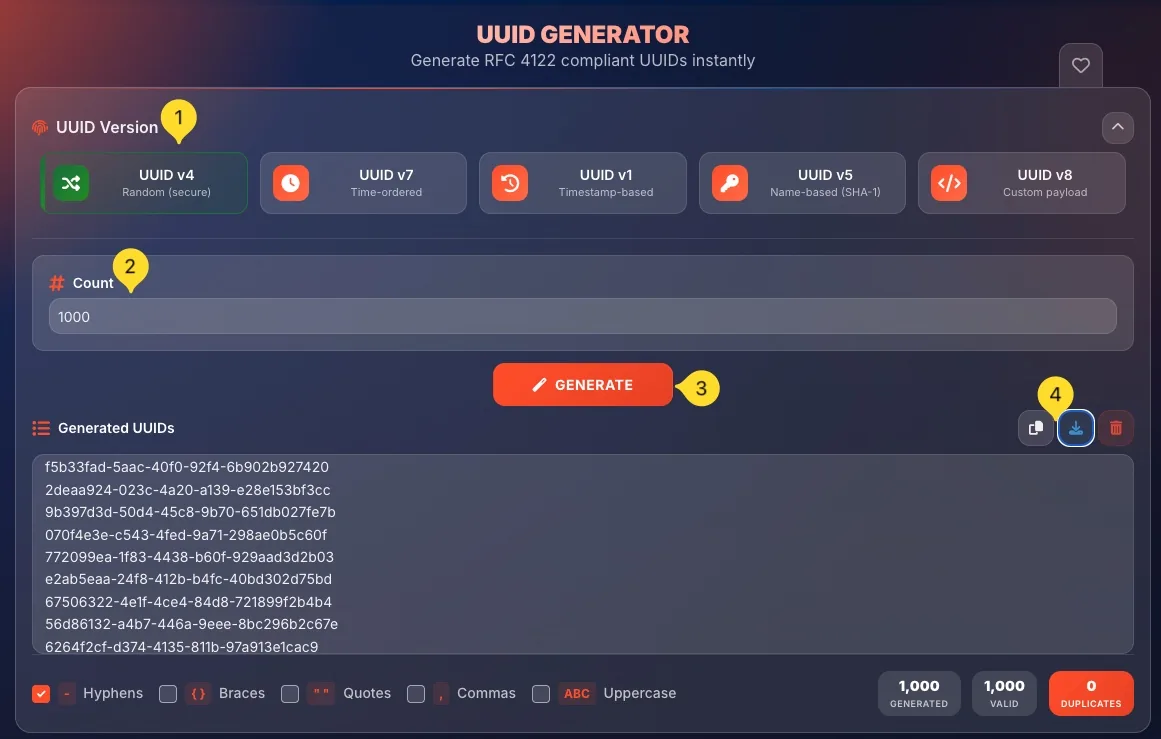
Click the UUID v4 button (shuffle icon) at the top. It shows Random (secure) as the description. This is the default mode when you open the tool.
Set the count
In the Count field (marked with # icon), enter how many UUIDs you want to generate. The default is 1, but you can generate multiple UUIDs at once.
Generate UUIDs
Click the orange GENERATE button. Your UUIDs appear instantly in the output area.
Copy or download
Use the Copy button (clipboard icon) to copy all UUIDs to clipboard, or Download (download icon) to save as a text file.
UUID v7 (Time-ordered) New standard
UUID v7 is a newer version that combines timestamps with random data. UUIDs are naturally sortable by creation time, making them ideal for databases.
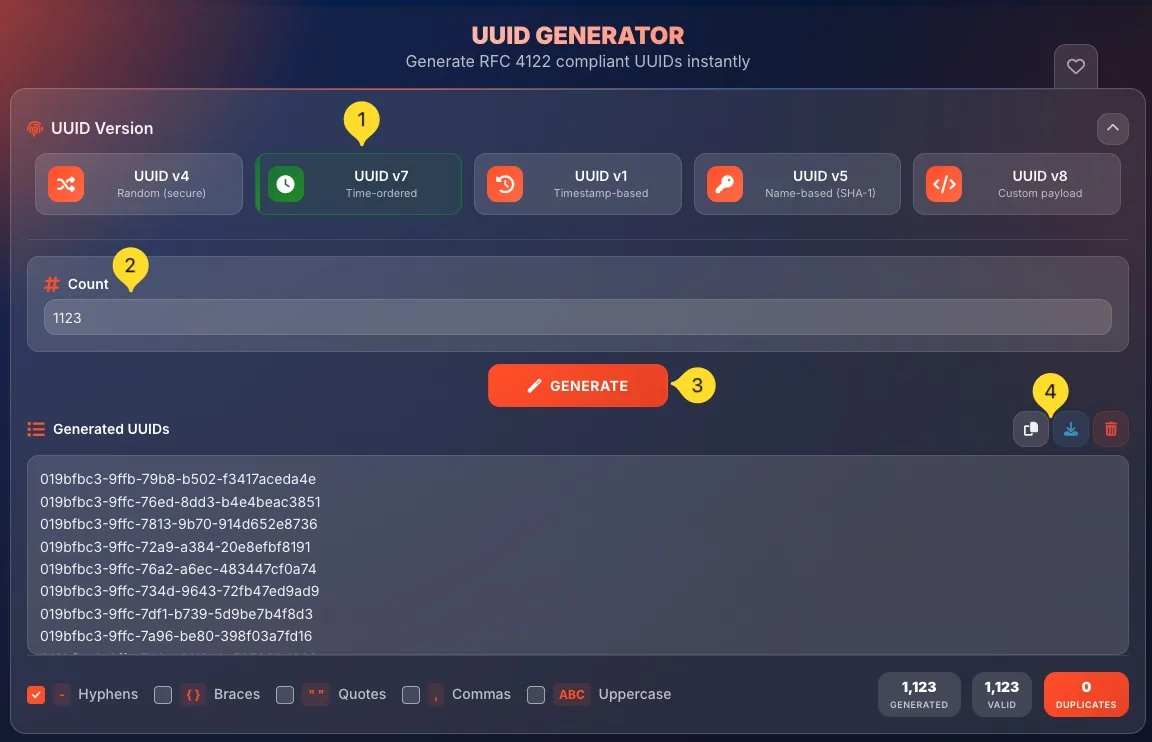
Select UUID v7
Click the UUID v7 button (clock icon) at the top. It shows Time-ordered as the description.
Set the count
Enter the number of UUIDs you want in the Count field.
Generate UUIDs
Click GENERATE. Each UUID contains a Unix timestamp in milliseconds, ensuring natural chronological ordering.
Copy or download
Use the Copy button (clipboard icon) to copy all UUIDs to clipboard, or Download (download icon) to save as a text file.
UUID v1 (Timestamp-based) Classic
UUID v1 is the original timestamp-based version. It combines a 60-bit timestamp with a node identifier (in browser implementations, a random node ID is used for privacy).
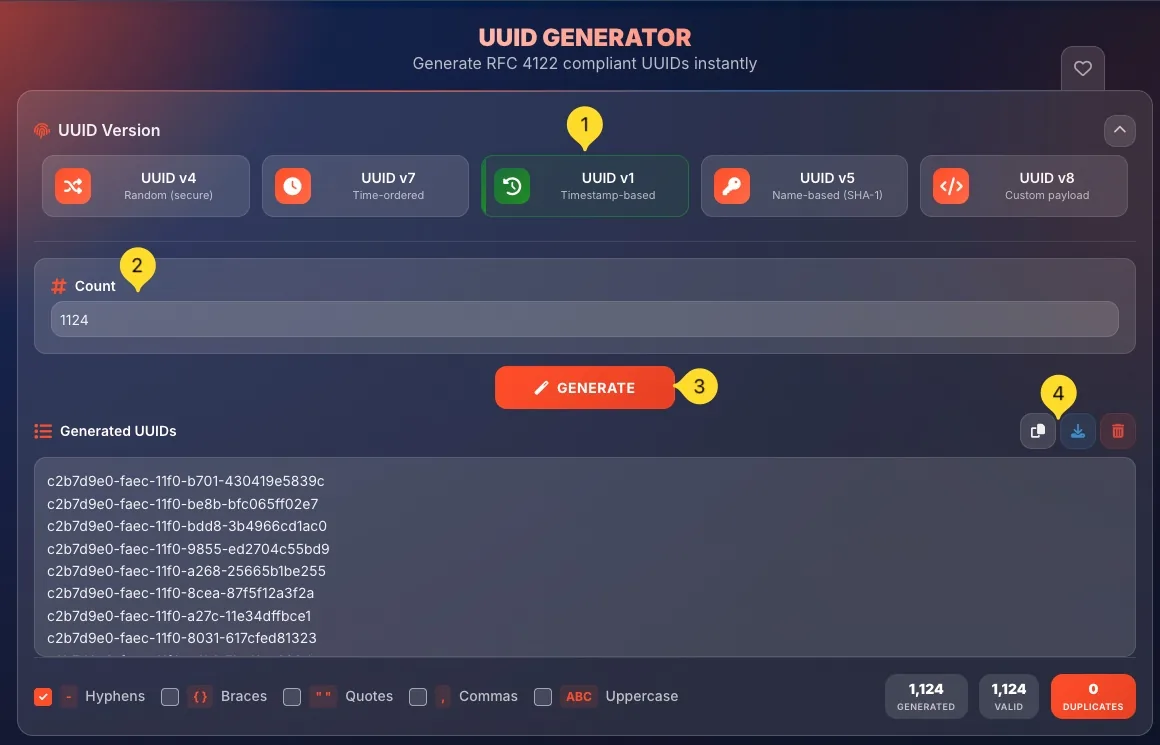
Select UUID v1
Click the UUID v1 button (history/clock icon) at the top. It shows Timestamp-based as the description.
Set the count
Enter the number of UUIDs you want in the Count field.
Generate UUIDs
Use the GENERATE button - each UUID contains a timestamp encoded in a specific format defined by RFC 4122.
Copy or download
Use the Copy button (clipboard icon) to copy all UUIDs to clipboard, or Download (download icon) to save as a text file.
UUID v5 (Name-based) Deterministic
UUID v5 generates deterministic UUIDs from a namespace and a name using SHA-1 hashing. The same namespace + name always produces the same UUID.
Select UUID v5
Click the UUID v5 button (key icon) at the top. It shows Name-based (SHA-1) as the description.
Choose a namespace
Select a namespace from the Namespace dropdown (folder icon). Options include:
• DNS: for domain names
• URL: for URLs
• OID: for ISO OIDs
• X500: for X.500 DNs
• Custom UUID: use your own namespace UUID
Enter the name
In the Name field (tag icon), enter the string you want to convert to a UUID. The placeholder shows Enter name for v5.... For DNS namespace, this would be a domain name like "example.com".
Generate UUID
Click GENERATE. The same namespace + name combination will always produce the identical UUID.
Copy or download
Use the Copy button (clipboard icon) to copy all UUIDs to clipboard, or Download (download icon) to save as a text file.
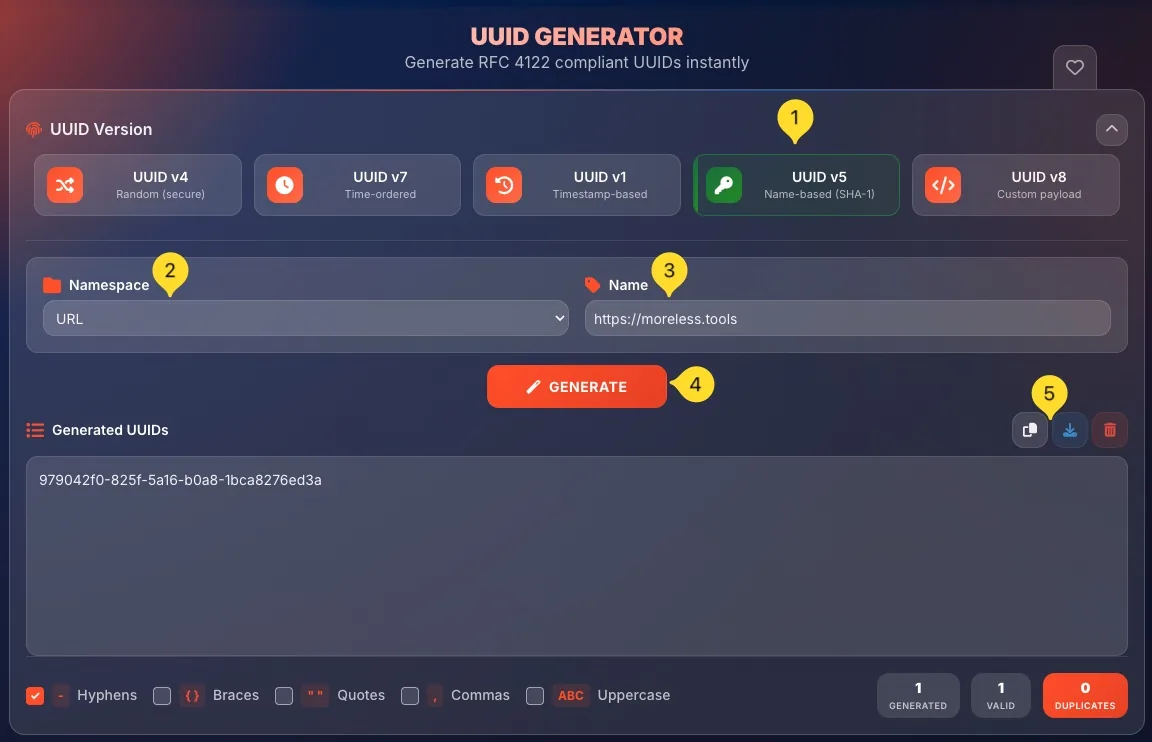
Example: generating a UUID for "[email protected]" will always return the same UUID.
Namespace options
UUID v5 requires a namespace - a predefined UUID that acts as a "salt" for the hash. RFC 4122 defines standard namespaces, or you can use your own:
DNS namespace
Use for fully-qualified domain names.
Namespace UUID: 6ba7b810-9dad-11d1-80b4-00c04fd430c8
Example name: example.com, api.mysite.org
URL namespace
Use for URLs including protocol.
Namespace UUID: 6ba7b811-9dad-11d1-80b4-00c04fd430c8
Example name: https://example.com/page
OID namespace
Use for ISO Object Identifiers.
Namespace UUID: 6ba7b812-9dad-11d1-80b4-00c04fd430c8
Example name: 1.3.6.1.4.1.343
X500 namespace
Use for X.500 Distinguished Names.
Namespace UUID: 6ba7b814-9dad-11d1-80b4-00c04fd430c8
Example name: CN=John Doe,O=Example,C=US
Custom UUID namespace
When you select Custom UUID, a third field appears: Custom NS (with antenna/broadcast icon). Enter any valid UUID to use as your own namespace. The placeholder shows UUID namespace.... This is useful for creating organization-specific or application-specific UUID hierarchies.
UUID v8 (Custom payload) Advanced
UUID v8 allows you to create UUIDs with custom data encoded in the UUID format. This version is for advanced users who need to embed specific information within a UUID structure.
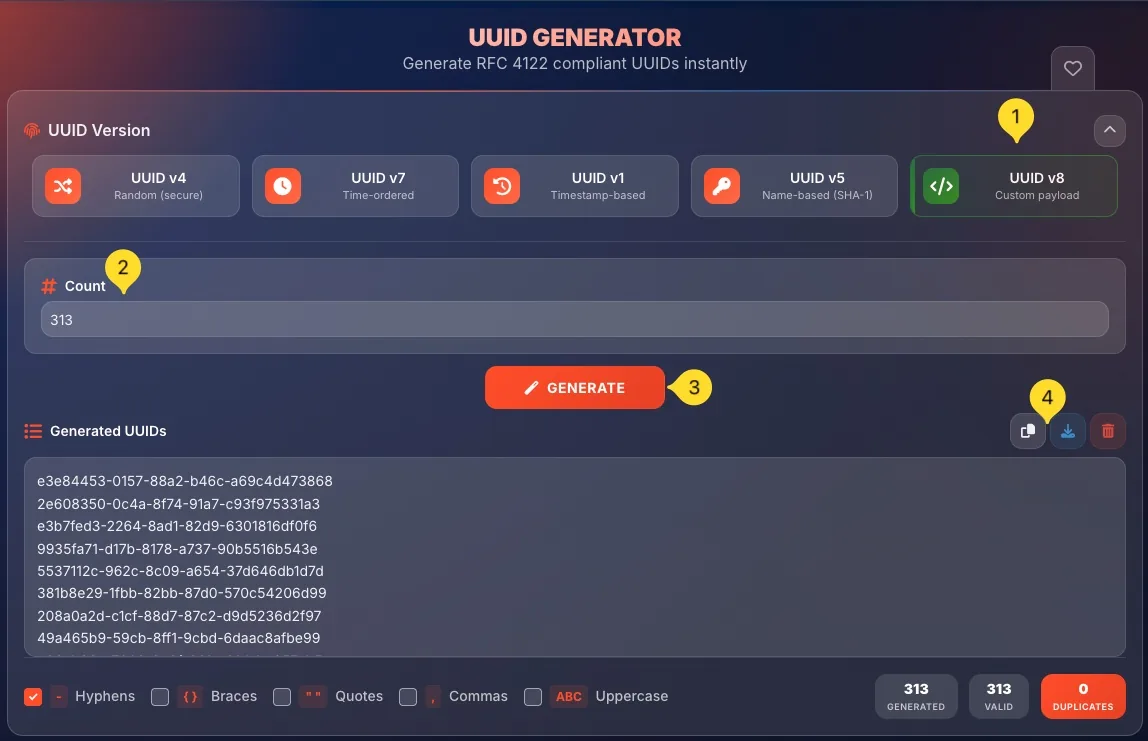
Select UUID v8
Click the UUID v8 button (code/brackets icon) at the top. It shows Custom payload as the description.
Configure payload
Enter your custom data according to the UUID v8 specification. The tool formats your input into a valid RFC 4122 compliant UUID.
Generate UUID
Click GENERATE to create your custom UUID. The version and variant bits are set automatically to indicate UUID v8.
Copy or download
Use the Copy button (clipboard icon) to copy all UUIDs to clipboard, or Download (download icon) to save as a text file.
Output formatting
The formatting options at the bottom control how your UUIDs are displayed and copied. These are useful for different programming contexts.
Hyphens
When checked (default), UUIDs include standard hyphens:550e8400-e29b-41d4-a716-446655440000
When unchecked, hyphens are removed:550e8400e29b41d4a716446655440000

Braces
When checked, wraps each UUID in curly braces:{550e8400-e29b-41d4-a716-446655440000}
Useful for: Microsoft GUID format, C# code, Windows registry entries

Quotes
When checked, wraps each UUID in double quotes:"550e8400-e29b-41d4-a716-446655440000"
Useful for: JSON, SQL INSERT statements, string arrays

Commas
When checked, adds commas between UUIDs (when generating multiple):uuid1, uuid2, uuid3
Useful for: Array initializers, CSV format, SQL IN clauses

Uppercase
When checked, converts letters to uppercase:550E8400-E29B-41D4-A716-446655440000
Useful for: Microsoft GUIDs, some legacy systems, visual distinction

Statistics counters
Three counters at the bottom right track your generation activity in the current session:
GENERATED
Shows the total number of UUIDs generated in the current session. This counter increments each time you click GENERATE, adding the count you specified.
VALID
Shows how many generated UUIDs pass RFC 4122 validation. This should always equal GENERATED - if not, there's an issue with the generation.
DUPLICATES
Shows any duplicate UUIDs detected (displayed with red background). With proper random generation, this should always be 0. A non-zero value would indicate a serious problem (extremely unlikely with cryptographic random sources).
When to use which version
Frequently asked questions
xxxxxxxx-xxxx-4xxx-xxxx-xxxxxxxxxxxx. For v7, it's "7", and so on. This is part of the RFC 4122 specification.